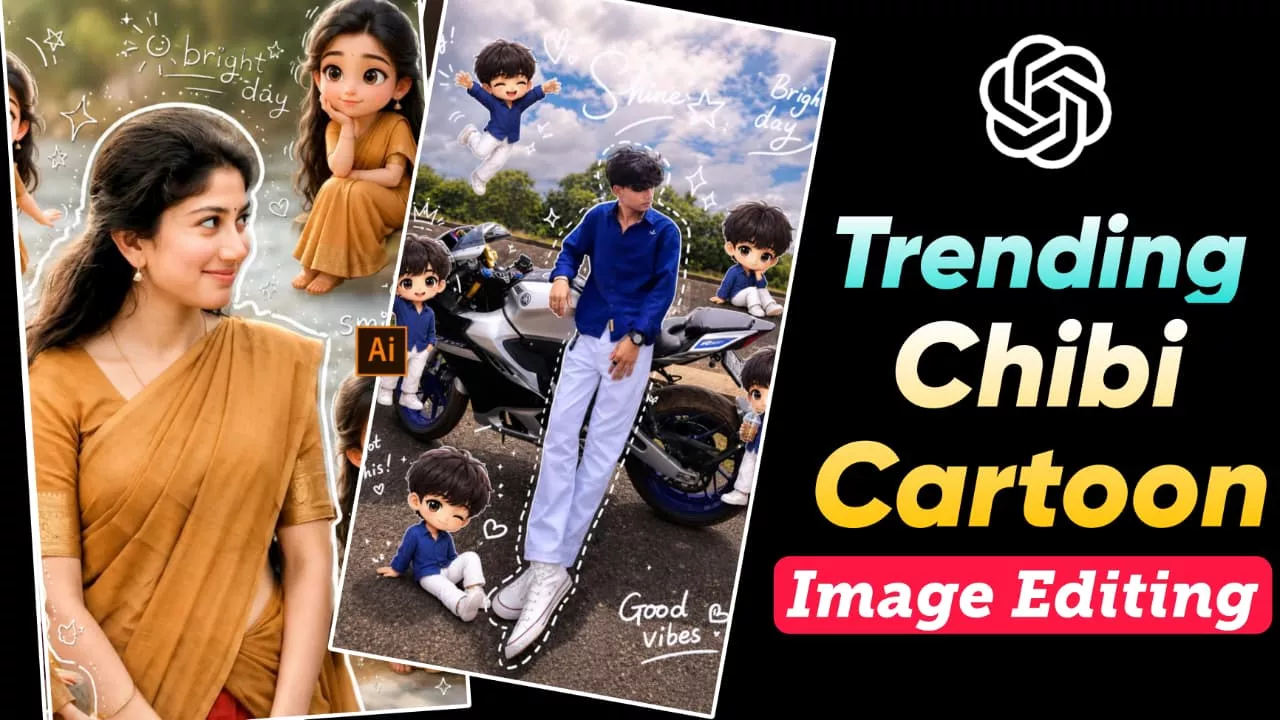
Chibi Cartoon Style AI Photo Editing ChatGPT Prompts – Friends, these days this type of cartoon-style AI photo is becoming extremely viral on Instagram and other social media platforms. Many people are creating these cute Chibi-style images and uploading them online, and honestly, they look very creative and eye-catching. So if you also want to create this kind of trending photo, then in today’s article we are going to teach you the complete process step-by-step.
All you need to do is read the article carefully from beginning to end without skipping anything. This style is very unique because it shows your real photo in the front while multiple tiny cartoon versions of yourself are placed all around you. These mini avatars appear in different poses—some dancing, some standing, and some doing fun actions—which makes the overall image look much more cute and creative.
Chibi Cartoon Style AI Photo Editing ChatGPT Prompts
Friends, right now anime and cartoon-style content is trending heavily on social media, and this Chibi-style editing is also part of that same trend. In this type of image, small cartoon versions of your own face are created and arranged around the main photo. The background usually contains a strong depth blur effect, while the cute chibi avatars are layered on top of it. Because of this, the final image gets a soft, aesthetic, and highly attractive look. Many people call it a “cute viral trend” because once someone sees these photos, they immediately want to create one for themselves too. The best part is that creating these images is very easy. You only need the ChatGPT app, which you can easily install from the Play Store or use through the browser version.
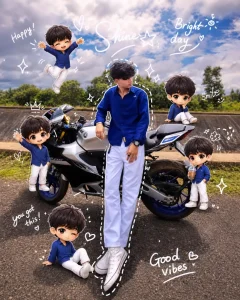
Use uploaded face reference (keep exact identity & features). Keep original background. Soft bright lighting with candy-tone highlights. Create a main portrait with multiple small glossy 3D chibi versions around (Korean cute style, pastel vibrant). Chibi actions: holding candies, lollipops, drinks, playful expressions. Add hand-drawn doodles: candy shapes, stars, swirls, cute icons. Include casual handwritten words: “sweet”, “fun”, “yay”, “cute mood”. Clean aesthetic layout, instagram style, 4:5 ratio.
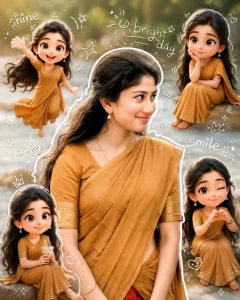
Use a real face as a reference photo.The background is the same as in the photo. The lighting is warm, soft, and clean, with subtle shadows. Around the image, add several mini chibi (3D cute style) versions of the character, while maintaining the original facial features.expressions: jumping cheerfully waving sitting relaxedholding a drink cute and playful expressions Add hand-drawn white doodle elements: outline around the main body stars, hearts, sparkles motion lines small cute icons Add aesthetic handwriting such as: "shine," "bright day," "happy," "smile," etc. (casual doodle font) Overall style: clean & aesthetic composition white sticker outline soft pastel color tone high detail 3D chibi glossy look cute Korean style instagrammable 4:5 ratio
How To Create Chibi Anime Image
Friends, making this type of image is actually very simple. You just have to follow a few easy steps:
- First, copy the prompt provided above
- To copy it, press and hold the prompt text and select it fully
- Then tap on the copy option
- After that, open the ChatGPT app or website
- Click on the (+) icon and upload your own photo
- Paste the copied prompt into the chat box
- Now click on “Generate” or send the prompt
After waiting a few seconds, your Chibi-style cartoon image will be ready. You can then preview it and easily save it to your gallery.
Why Are Cartoon Style Photos So Viral?
Friends, if you upload a simple normal photo on social media, usually it doesn’t get much attention. But when you add creativity and cartoon-style elements to your image, people instantly find it more interesting. That’s exactly why these Chibi-style photos are becoming viral. The tiny cartoon avatars make the image look more cute, fun, and visually different from regular photos. Because of this, people like, share, and repost them more often. Another reason is that anime-style edits are already very popular online. So when someone sees a creative cartoon version of a real photo, they also want to create their own image in the same style. This is why such edits spread so quickly on Instagram and other platforms.
Conclusion
By using the simple method explained in this article along with these Chibi Cartoon Style AI prompts, you can easily create your own trending cartoon-style image. Friends, I hope you really liked today’s article and understood the full process properly. If you found this guide helpful, then definitely share your feedback. And if you face any problem while creating your image, you can always ask your question in the comments or message us directly. From now on, whenever new AI photo editing trends go viral, we’ll continue bringing all those latest prompts and tutorials for you so that you can create your photos easily without searching anywhere else.