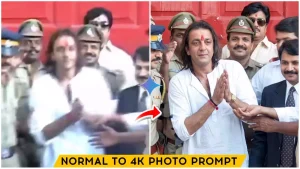
Normal To 4k High Quality Photo Editing Prompt – In today’s time, everyone definitely has some old photos that are either blurred, damaged, or low quality. Many of these photos are from our childhood or from our family collection, which become faded or unclear over time. But still, we want to restore those photos and make them look clear again.
So if you also have such photos and want to enhance them, then this article is going to be very useful for you. In this article, I will provide you with a prompt using which you can convert any old or damaged photo into a 4K high quality image with the help of AI. I will also explain the full process so that you can easily understand how to do it.
Which Tool We Will Use For Editing
Look, we are going to do this editing using Google Gemini AI. This tool takes your old photos—especially those which are blurred or damaged—and enhances them to create a high-quality AI image that looks completely realistic. The best part is that you don’t have to do any manual editing. You don’t need any paid tools or skills. Everything can be done for free just by using a prompt. You just need to use the prompt properly, and your image will be ready in high quality. In this article, I have explained everything step-by-step.
[Subject & Composition]: Exact match of the provided reference image. Reproduce the identity, expression, pose, angle, outfit, hairstyle, and overall mood perfectly without altering facial features.[Quality & Restoration]: Ultra-realistic, 8K+ resolution, ultimate image restoration,512K-grade texture mapping, zero noise, zero motion blur, extremely sharp, masterpiece, award-winning high-end photography.[Facial Detailing]: Absolute maximum detailing. Extreme micro-skin texture, visible pores, natural fine lines, ultra-sharp facial contours, flawless skin realism.Crystal-clear eyes with perfectly sharp micro-reflections.[Lighting & Colors]: High-end studio lighting, HDR color science, ultra-clean tonal gradients, flawless highlight-to-shadow balance, perfect skin tone accuracy, lifelike vibrant colors.[Camera & Optics]: Premium DSLRaesthetic, 85mm lens, f/1.4 aperture, hyper-depth cinematic background. Super-clean bokeh effect, perfect subject isolation, pristine photographic clarity, 9:16 aspect ratio framing.
Which Type of Photos This Prompt Works
Now let me tell you which type of photos you should use for this editing. This method works best on photos that are:
- Old and damaged
- Blurry or low quality
- Faded family photos
- Childhood images
For example, you might have old photos of your grandparents or family members which are not clear anymore. Or maybe your own childhood photos are in poor quality. You can simply click a photo of those images using your phone and upload it in the AI tool. After that, by using the given prompt, you can convert them into a clear 4K image.
How To Use Normal To 4k Ai photo Editing Prompt
Now let’s understand the process step-by-step in a simple way:
- First, copy the prompt given above
- Now open Google Gemini AI
- Click on the Create Image option
- Paste the copied prompt in the text box
- Click on the + icon and upload your old photo
- After that, click on the Generate button
Within a few seconds, your old and damaged photo will be converted into a 4K high quality image which looks very realistic.
Conclusion
So friends, in this way you can easily enhance any old, blurry, or damaged photo into high quality. Earlier, it used to take a lot of time and editing skills to restore such photos, but now with AI tools, it has become very simple. You just need to use the prompt and upload your photo, and your image will be ready instantly. This type of photo editing is also trending right now. You can create before-after videos using your old and enhanced photos and upload them on social media. Your video can also go viral. So don’t wait, try this method now and convert your old memories into 4K quality images easily 🚀