Poster Style AI Photo Editing Prompts – Friends, nowadays you must have noticed that movie-poster-style AI photo editing is becoming extremely viral across Instagram, Pinterest, YouTube Shorts, and even Facebook. Everywhere people are creating cinematic poster-style images using AI tools like ChatGPT and Gemini because these edits instantly transform a normal photo into a professional-looking movie poster. Both boys and girls are creating these stylish images with their own names written in bold cinematic fonts, and honestly, these edits look so realistic that people stop scrolling just to look at them carefully. The best part about this trend is that you do not need any professional editing skills or complicated software to create such photos. You only need a good-quality image and the correct AI prompt. In today’s article, I am going to explain everything step-by-step, including how these poster-style AI photos work, why they are becoming viral, and how you can easily generate your own cinematic poster image using ChatGPT or Gemini.
Overview Of Poster Style AI Photo Editing Prompts
Friends, let’s now understand why this poster-style AI editing trend is becoming so popular online. This type of AI-generated image gives your photo a complete cinematic movie-poster appearance with dramatic lighting, stylish typography, aesthetic color grading, and ultra-realistic face detailing. Most creators are using dark cinematic backgrounds, neon lighting, smoke effects, vintage textures, and action-movie-style compositions to make their edits look highly premium and visually attractive. One of the biggest reasons why people love these edits is that AI tools can now create realistic images without heavily changing or distorting the face. When you upload a clear image, the AI keeps your face recognizable while adding cinematic poster elements around it. Many users are also adding their names in bold stylish fonts, which makes the image feel even more personalized and professional. Because of these creative details, these poster-style edits are currently becoming one of the most viral AI photo trends on Instagram.
Why Poster Style AI Photos Are Becoming Viral?
The main reason behind this trend’s popularity is that people love images that look creative, cinematic, and different from ordinary selfies. Normal photos often fail to attract attention on social media, but poster-style AI edits instantly stand out because they look similar to movie posters, gaming covers, or Netflix-style promotional artwork. The dramatic lighting, professional text effects, realistic shadows, and cinematic mood make these images look extremely premium. Another reason this trend is spreading so fast is because AI tools like ChatGPT and Gemini have made advanced editing accessible to everyone. Even users who have never edited a photo before can now create high-quality cinematic edits within just a few minutes simply by using prompts. Nowadays creators are using these AI poster images for Instagram posts, profile pictures, YouTube thumbnails, WhatsApp DPs, gaming profiles, aesthetic wallpapers, and social media covers.
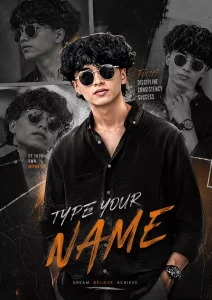
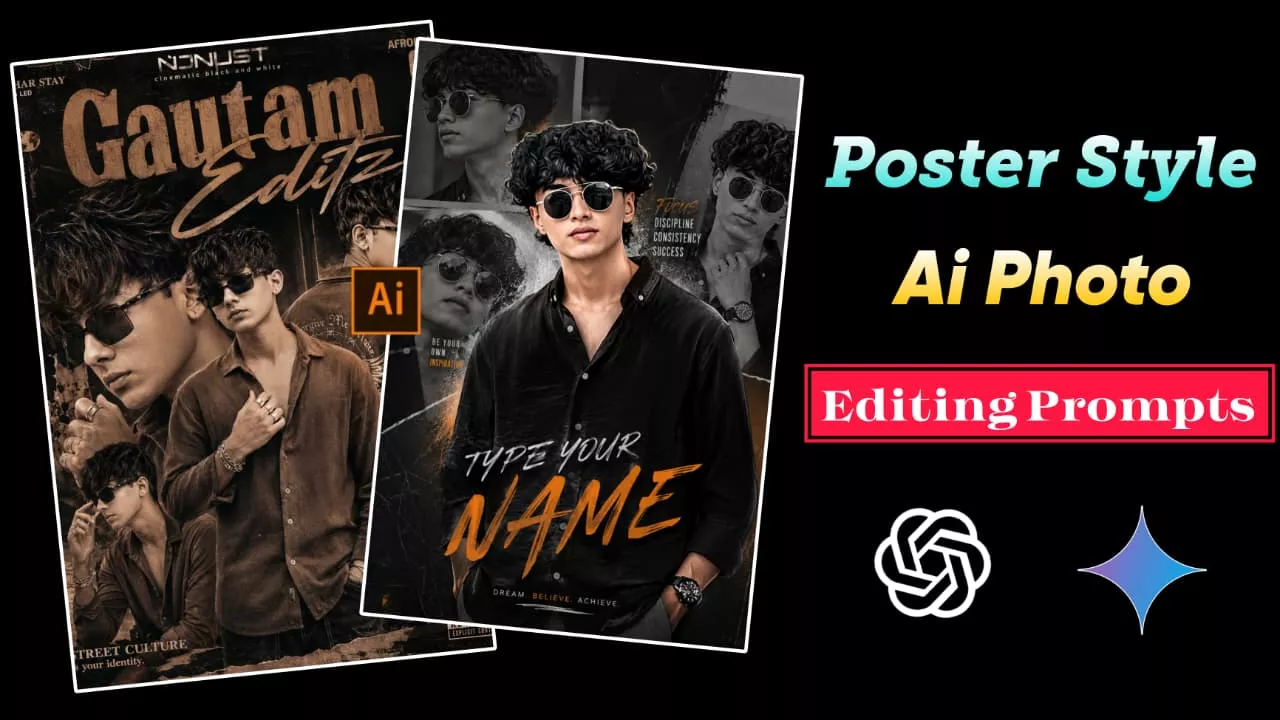
"Create a high-quality cinematic collage poster of a teenage boy with stylish curly hair and black outfit, inspired by modern Instagram creator edits. The design should have multiple black-and-white side portraits in the background and one detailed main portrait in the center with a digital painting effect.tex by. " TYPE YOUR NAME "
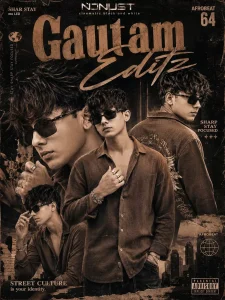
A retro-urban styled poster ARD featuring a young refference with image artist in multiple poses. He wears a brown casual shirt and background embroidered on the back., multiple silver rings and bracelets emphasize his flashy.NAME ISNJUST cinematic black and white SHAR STAY mo LED The design is layered with close-up portraits, warm brown tones, bold typography reading "TYPE YOUR NAME" a modern magazine-style collage aesthetic, representing Afrobeat 64 and street culture
Top Best Prompts For Poster Photo Editing
Friends, before using any AI prompt, always remember one important thing. Most prompts include a default sample name inside them, so before generating your image, replace that default name with your own name for personalized and better-looking results. This helps the AI create a more realistic poster design with your custom identity. Apart from this, if you want more cinematic output, you can also customize the prompt slightly by adding keywords like “moody lighting,” “retro movie poster,” “cyberpunk style,” “dark cinematic atmosphere,” or “Netflix-style poster.” Small customizations like these often make the generated image look much more unique and professional compared to normal AI outputs.
How To Create Poster Style AI Photo Editing Prompts using chatgpt
Now let’s understand how you can easily create your own viral poster-style AI images step-by-step. The process is very simple, and even beginners can follow it without facing any confusion.
First of all, install the ChatGPT or Gemini app from the Play Store or App Store.
After installation, open the app and log in using your Google account.
Now select a clear and good-quality photo of yourself.
Copy the poster-style AI prompt from the website or article.
Paste the prompt into the chat box inside ChatGPT or Gemini.
Before sending the prompt, replace the default name with your own name.
Upload your selected photo along with the prompt.
Now click on the Send or Generate button and wait for a few moments.
The AI tool will process your image and create a cinematic poster-style photo automatically.
Finally, save the generated image to your gallery and share it on Instagram or other social media platforms.
Which Type Of Photos Give Best Results?
Friends, not every image gives perfect cinematic results. For the best poster-style AI output, always use high-quality photos with proper lighting and visible face details. Portrait photos clicked in daylight usually work much better because AI can clearly understand facial structure and expressions. Avoid blurry, dark, low-resolution, or heavily filtered images because these often create distorted outputs. Stylish outfits like jackets, hoodies, sunglasses, streetwear, or cinematic poses also help make the final image look much more attractive and professional. If possible, use photos with simple backgrounds because AI can then focus more accurately on your face and poster composition.
Why People Prefer ChatGPT And Gemini For AI Editing?
Nowadays many creators prefer using ChatGPT and Gemini for AI image generation because these tools can create highly detailed and realistic outputs within just a few seconds. Instead of spending hours learning professional editing software, users simply upload a photo and paste a prompt to get cinematic-quality results automatically. These AI tools also save a huge amount of time because all effects like lighting, shadows, typography, textures, and color grading are generated automatically. Another important reason is that modern AI tools now preserve face quality much better than older editing apps, making the final image look cleaner, sharper, and more realistic.
Final Thoughts
Overall, poster-style AI photo editing is currently one of the most viral and creative trends on social media. The combination of cinematic lighting, dramatic backgrounds, stylish text effects, and realistic face detailing makes these images look extremely premium and eye-catching. In today’s article, I explained everything in detail, including how this trend works, why it is becoming so popular, and how you can easily create your own movie-poster-style AI images using ChatGPT or Gemini. If you use a clear image and follow all the steps correctly, you can create a stunning viral-worthy poster edit within just a few minutes. So this is the perfect time to try this cinematic AI trend and share your own stylish poster image while it is still going viral everywhere online.